If you are here for the My Sketch World Blog Hop, scroll down or click
here.
You may recall that the purpose of this challenge group is to take our scrapbooking to the next level, to stretch our creative process and to grow as artists by embracing challenges that make us think, work and grow.
This month, our challenge comes from the very sweet and very talented Joanne Burton. Joanne resides in Waterloo and co-owns a scrapbook store there with her bff. Her scrapbooking style is classicly elegant and always showcases wonderful photos. It's no wonder that her challenge to us is centered around the photo - here is the challenge, in Joanne's own words:
Inspiration Elevator has been such a tremendous experience for me! We have explored our style, stretched our single pages into two, documented our fears and regrets, scrapbooked our beliefs, worked with less than perfect photos and have even gone vintage! Hopefully we have each grown as a result of being a part of this group – I know I have!
One of the fun things about scrapbooking is working with our photos. We get to pick and choose our favorite photos and have fun recording the memories behind them. So this month, I thought we could stretch our creativity by having some fun with our photos!
I assume we all work with digital photos, so this month’s challenge will work for each of you. I want you to pick a photo and then alter it in some way using your favorite photo editing program. I would like to see something more than just making your photo black & white. Maybe use a special effect, add a frame, play with text, etc. There is so much you can do!
Play with your photo until it conveys a particular look or feel that will help you to express your memories associated with that picture. Then add it to your page! When you post your finished project, please share how you altered your photo, and why you chose the effects you did. (Maybe you could even post a before and after of your photo!)
I hope you will stop by and see what the designers on this adventure have created:
Lisa Spiegel
I really enjoyed this challenge and yes, it was a challenge! I am very computer illiterite , but I am learning every day and have come along way already!
A friend and fellow design team member on a message board I am on has been talking about
PicMonkey. She alters photos and makes sketches at PicMonkey. I decided to try it last month and made a few sketches. I don't own Photoshop or any decent photo editing software, so I thought I would give PicMonkey a try at photos. I love what I did!
Here's my original photo:
I played around with the brightness (-7), shadow (10) and clarity (7%):
Then I added a Polaroid frame with text on the bottom of it. I then took it a little further and hand tinted one in blue, red and yellow. Well, all I really had to do was push a button ;)
Here are the photos:
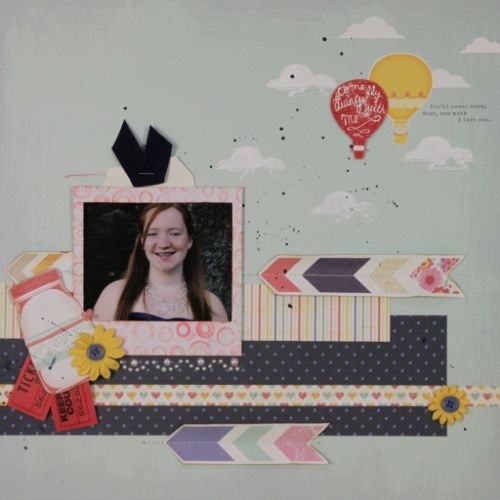
and here is my layout using My Mind's Eye Miss Caroline Collection;
I will definately be playing more with PicMonkey, I love the outcome! Thanks for the challenge Joanne!
Thanks for stopping by and sharing your day with me!


.jpg)

 to My Sketch
World Blog Hop!
to My Sketch
World Blog Hop!


.jpg)


.jpg)